
If you are using Amazon Prime videos on a limited amount of data, it is crucial to monitor how much data is consumed by the streaming services. It is relatively easy to manage the data on Amazon Prime as it gives the users full control over limiting their consumption. Users can change qualities or opt for downloaded videos to reduce their internet bills.
Want to avoid paying an extra charge to your network operator? Learn to manage data usage while streaming your favorite show on Amazon Prime by choosing an appropriate data plan.
How much data does Amazon Prime video use?
You can limit your data plan only when you know the exact amount consumed while watching the Amazon Prime videos. Follow these steps to understand the overall data used when you stream Prime in your device for an hour:
- Run Amazon Prime on your device
- Go to the Menu option.
- Open settings of your Amazon Prime Video app
- Go to the Stream and Download option.
- Tap on the Streaming Quality option
Four options appear on the screen, along with their data usage of an hour:
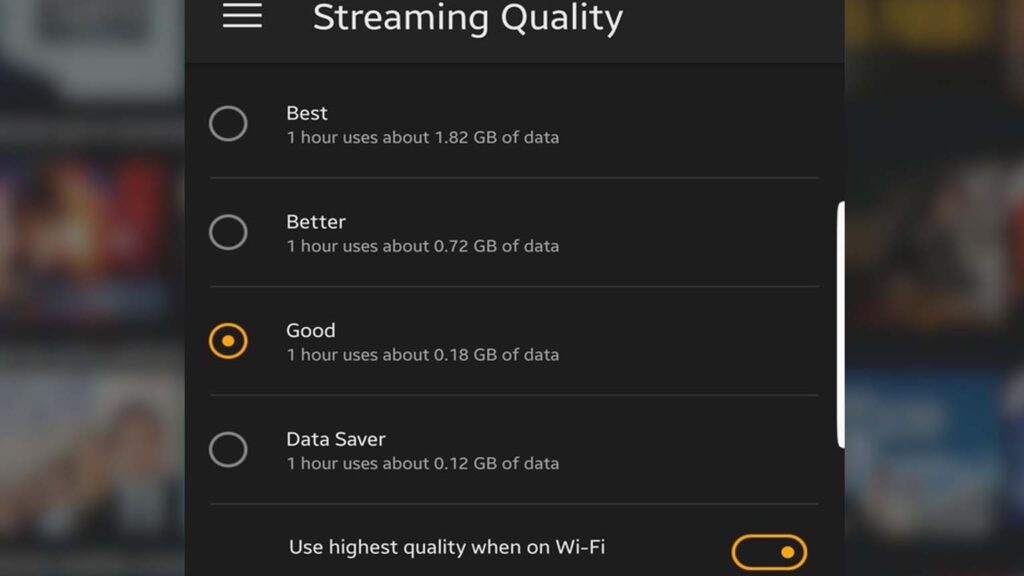
- The best quality uses around 0.46 GB of data for an hour.
- The better quality uses around 0.26 GB of data for an hour.
- The good quality uses around 0.18 GB of data for an hour.
- The Data Saver mode uses around 0.12 GB of data for an hour.
Below these streaming qualities is an option to enable the Highest Quality when using Wi-Fi. The streaming quality of videos from Good to Best depends on the amount of data consumed. If you are short on data, you can still watch a movie by lowering the video’s quality.
Steps to manage your Amazon Prime data usage
Amazon Prime gives its users an option to download the videos offline and watch them even when Wi-Fi or any internet source is not available. Downloading the video eliminates any lags you can face due to slow internet connections while watching your favorite series. You can watch the downloaded videos multiple times, and it will consume less data than streaming the videos online.
Steps to download Video on Amazon Prime:
- Open any movie or series that you want to download
- Once you click on the move/series, a video page will appear.
- There are various options available -Watch now, Download, Add to watchlist and Watch the trailer.
- Select the Download option
You have to choose which quality you want to download the video and watch any movie or series uninterrupted. Prime makes it easier to see how much data you will be utilizing while downloading a video on this platform.
How to find the downloaded files?
- Go to the Menu
- Tap on Downloads
A list of all your downloaded files will appear, and you can select any file to watch offline without worrying about the data usage.
You can use these simple methods to limit data consumption and freely watch all the amazing shows and movies on Amazon Prime.
Recommended for you:
