
• Skip to main content
  • Skip to primary sidebar
  • Skip to footer
TechieGenie

TechieGenie

  • Technology
  • Blogging
  • Relationship
  • Travel
Home » Social media » Facebook » This page isn’t eligible to have a username on Facebook (FIXED)

This page isn’t eligible to have a username on Facebook (FIXED)

July 13, 2026 by Tejas Maheta Leave a Comment

Page owners on Facebook can create a custom URL for their business page. Though the procedure is straightforward, the user can sometimes experience the “This page isn’t eligible to have a username” problem. This guide will help you step by step to resolve this error.
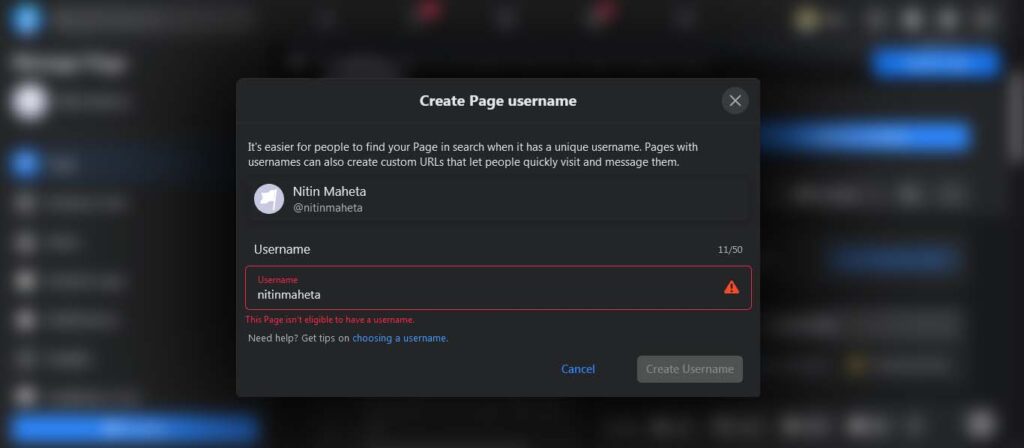
This-page-isn’t-eligible-to-have-a-username-on-Facebook

Table of Contents

Toggle
  • Possible reasons for this error:
  • Using a different Facebook account

Possible reasons for this error:

Your page might not have met one of the following requirements set by Facebook, thereby leading to the problem:

  • Your Facebook page doesn’t have at least one post and 25 page likes.
  • Your Facebook Page may not be verified.
  • You may not be an admin of the page for which you are attempting to create a username.

Attempt to satisfy these requirements and try again. If the error persists, follow the below-mentioned steps to fix the error.

Using a different Facebook account

  • Log in to Facebook with your main account.
  • Navigate to “Settings” and open “Page Roles.”
  • Enter the name or email of the user you wish to add as an admin in the “Assign a new Page role” text box.
  • Choose the profile and switch the Editor mode to “Admin” by clicking on the “Editor” option.
    Select “Add.”
  • Now login with the credentials of the account you made as admin.
  • Select the “Manage Pages” option by clicking the arrow icon in the top-right corner.
  • Choose the page you want to manage.
  • Select “About.”
  • Select “Create a page @username.”
  • Enter the username of your choice and select “Create a username.”

You have now successfully created a custom URL for your Facebook page.

Recommended for you:
How to delete a Facebook account permanently

About Tejas Maheta

Tejas Maheta is editor in chief and webmaster of TechieGenie Blog. You may reach him out on following social media:
Facebook | Twitter | Instagram

Reader Interactions

Leave a Reply Cancel reply

Your email address will not be published. Required fields are marked *

Primary Sidebar

  • Facebook
  • Instagram
  • LinkedIn
  • Pinterest
  • Twitter

Recommeded Posts

  • How To Change Language On Facebook?
  • How to delete a Facebook account permanently
  • How to delete your WhatsApp account permanently
  • How to make a single name account on Facebook
  • Lasso by Facebook- The Competitor of Tiktok
  • How to Fix Support Code C14a Error On Snapchat
  • WhatsApp Notification Tricks: Tailoring Alerts for Contacts
  • How to Delete a TikTok Account
  • How to Fix There Was a Problem with Your Request Instagram
  • How do I logout of Facebook on Android?

More to See

9-Month Birthday Wishes

Happy 9 Months Birthday Wishes For Baby Boy

By Tejas Maheta

How-to-Fix-Chromecast-Not-Working-Issue

How to Fix Chromecast Not Working Issue

By Dinesh Goswami

Amazon-Echo-Echo-Dot-and-Echo-Plus-the-Music-in-India

Amazon Echo, Echo Dot and Echo Plus the Music in India

By Tejas Maheta

How to Find Nearby Friends on Snapchat

How To Add Nearby Friends On Snapchat

By Tejas Maheta

How-to-Play-the-Wedding-Shoe-Game

How to Play the Wedding Shoe Game

By Priya Batra

How-to-make-her-miss-you-after-a-break-up

How to make her miss you after a break up

By Priya Batra

Footer

About Us

TechieGenie is a one-stop online solution Marketplace, which is owned by Tejas Maheta, a renowned blogger. You will find great insights shared by him in the blog section..[Read more]

Recent Posts

  • How to Download Instagram Reels: A Step-by-Step Guide
  • 400+ Comments to Add in Your Friends Instagram Posts to Make Them Fееl Loved!
  • 10 best Instagram Story apps for Android
  • Best Hydrogel Screen Protectors – Self-Healing Technology
  • Best Gaming Chairs On Amazon In 2026
  • About Us
  • Contact Us
  • Write for Us
  • Privacy Policy

© 2026 TechieGenie
The owner of this site is a participant in the Amazon Services LLC Associates Program, an affiliate advertising program designed to provide a means for sites to earn advertising fees by advertising and linking to amazon.com.